Sunday, June 10, 2018

My Browser(they are very very slow) Benchmark tests(kinda) 2018

I have had many problems with Mozilla Firefox. I'm tired of Firefox browser, it is very slow despite the claims that it is very fast. I run multiple different tests

during benchmark test, drowsy, slow firesucks(firefox)

on my different browsers and I want to share them with you. You will decide which browser is the fastest.
My Operating System is Windows 10 64 bit.

Microsoft Edge 17 web basemark score:

MS Edge 17 Jetstream score:
MS Edge 17 Speedometer score:

It is too difficult to MS Edge 17 to handle the ARES-6 test:
Finally MS Edge 17 finished its ARES-6 test:


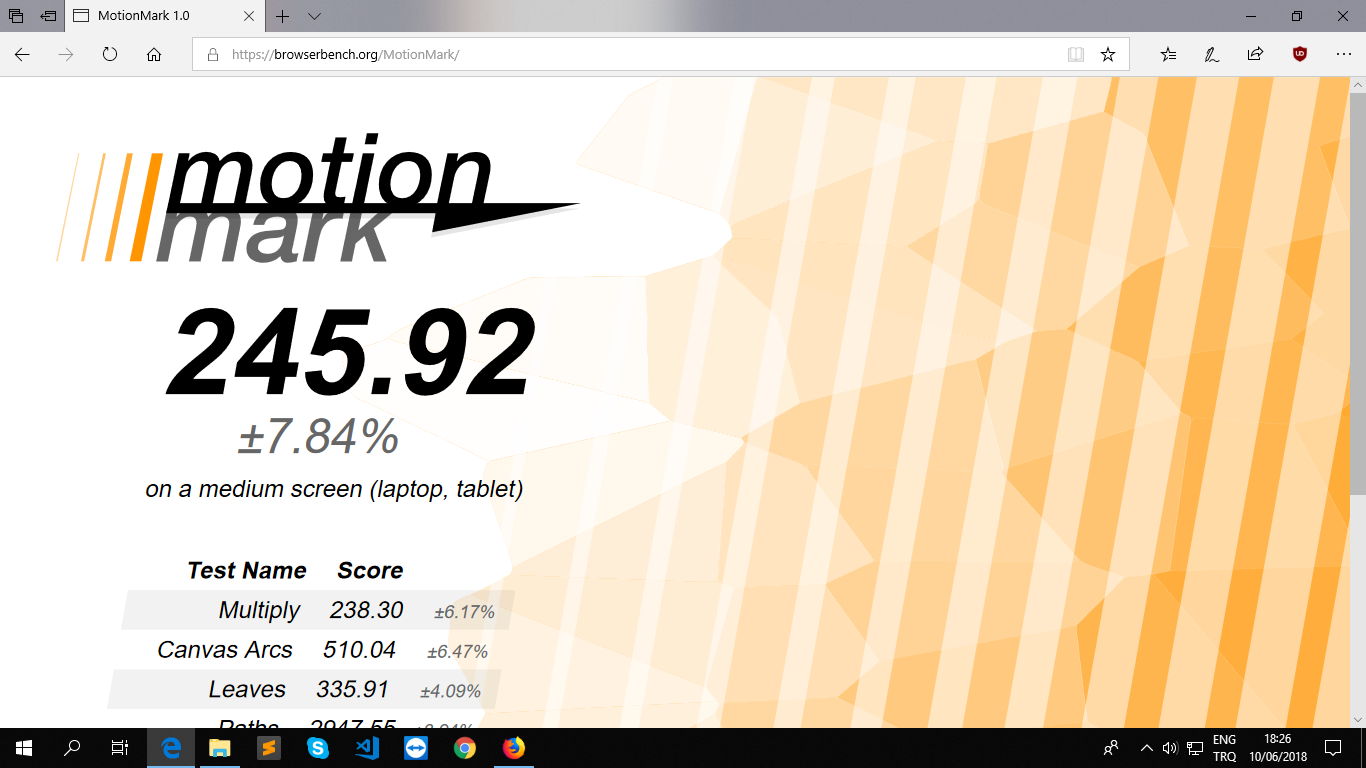
MS Edge 17 MotionMark score:


Google Chrome 67 web basemark score:

Google Chrome 67 Jetstream score:
Google Chrome 67 Speedometer score:


Google Chrome 67 ARES-6 score:

Google Chrome 67 MotionMark score:


Mozilla Firefox 60 Web basemark score:

Mozilla Firefox 60 Jetstream score:
Mozilla Firefox 60 Speedometer score:

Mozilla Firefox 60 ARES-6 score:


Mozilla Fire(sucks)fox 60 totally stuck when I run MotionMark test on it:
Fire(sux)fox stuck again:
Finally, Mozilla Firefox 60 managed to finish MotionMark test:


Opera 53 Web basemark score:


Opera 53 Jetsream score:
Opera 53 Speedometer score:

Opera 53 ARES-6 score:


Opera 53 MotionMark score:


After all those tests, I don't know which browser is faster, but I do know which is the slowest. I think, Mozilla Firefox is the slowest of all browsers listed here. I used Firefox for last 6-8 years, but over the time Firefox turned into firesucks. It was faster long time ago, but it is very slow now. I don't want to use MS Edge or Google Chrome. I thought of using Chromium, which is kind-of open source version of Google Chrome, but it turns out that Chromium isn't present at the moment for Windows OS. I may use Vivaldi browser, but the lack of commonly shareable bookmarks makes that idea difficult. I wish I had a site where I can store my bookmarks and I could switch between the browsers whenever I wanted. Thanks.

Edit on 10 June 2018, at 21:17 Istanbul time:
Vivaldi 1.96 Web basemark score:

Vivaldi 1.96 jetstream score:

Vivaldi 1.96 Speedometer score:

Vivaldi browser 1.96 ARES-6 score:


Vivaldi browser 1.96 MotionMark score:


I think Google Chrome is faster than other browsers, at least benchmark results point out that, I guess.


Metrics MS Edge Chrome Firefox Opera Vivaldi
Web Basemark 180.11 307.89 48.23 363.03 272.94
JetStream(big good) 138.64 105.27 148.01 108.41 146.18
Speedometer(runs/min) 23.3 84.0 29.5 46.6 65.5
ARES-6(ms) 127.25 32.17 111.25 33.96 50.93
MotionMark 245.92 265.42 176.25 181.02 231.99
Overall Bad The Best The Worst Good Good

This test was run on 10 June 2018 at PC with Intel 3.50 GHz Processor, 8 GB RAM and Win 10 Pro 64-bit.

Tuesday, May 8, 2018

Sublime Text as a C and C++ compiler or editor on windows.

When using Sublime Text as a C/C++ compiler on Windows 10, I come over %PATH% problem. In the beginning, I didn't know how to set the path for g++ or gcc. Later on, I learned it, so I share it here in case you have the similar problem.

Open Control Panel desktop app, you can do it by typing "Control Panel" on the start menu or clicking on Settings on Start menu. After Settings, I clicked on Apps in Settings, after that, I clicked on "Programs and Features" on the right side, just under the Related Settings. There opened somewhat old looking Programs and Features control panel, there I clicked Control Panel home on the top-left side. After that, you are in the real, old school, cool control panel home. There I clicked on User Accounts, then again User Accounts and now you can see "Change my environment variables" on a down-left menu. Click on that, now you can set gcc, gnu  c++ path on environment variables. When you click on environment variables a window related to that will open. You will see "Path" there, click on that. Now click on the "Edit", then click on "New" and then "Browse". Now go to the "bin"  folder where is your Cygwin or MinGW or MSYS are installed, generally they are inside of C: drive.

You can also use a different way to reach to Environment variables. Control Panel Home -> System and Security -> System, now you'll see "Advanced System Settings" on the left side menu down there, you'll see "Environment Variables" on the "Advanced" section, click here and you can now edit the "Path."

In order to install Cygwin just google it or click here: https://www.cygwin.com/setup-x86_64.exe for 64-bit or here for 32-bit: https://www.cygwin.com/setup-x86.exe. And then install it.

You can download and install MinGW, just google it.

After installing them, set your environment variables to their bin folders. In m,y case it was like that.
You can check confirm if everything is OK, by writing "gcc --version", "g++ --version", "gdb --version", "gcc -v", "g++ -v" or "gdb -v" on Command Prompt. If you don't know how to open Command Prompt, then click Windows button + r, it will open Run, then write there cmd, it will open Command Prompt.

Now, you can open Sublime Text and run a simple hello world of C or C++, write the code, and  Tools -> Build or Ctrl + B, then it will run successfully. Well, you might be surprised that your Sublime Text only shows Finished in 0.1s or something like that, but there is no "hello world" written there. Open Command Prompt and go to your directory where is your code is saved and compiled, you'll see there "a.exe", write "a" to your cmd(Command Prompt). It will show the output on Command Prompt. If you don't know how to navigate in cmd, then write "pwd" it is a "print working directory", you can change the drive by writing the name of the desired drive for example, "D:". And then write "dir" to see a listing of files and folders on that folder or drive, then change your current location by writing "cd [folder-name-here]" for example, if you want to enter into my-codes folder then write "cd my-codes". Similarly, "cd .." is going one folder upwards or backwards.

For additional resources: https://www3.ntu.edu.sg/home/ehchua/programming/cpp/gcc_make.html
and https://www3.ntu.edu.sg/home/ehchua/programming/howto/Cygwin_HowTo.html 

Edit on 08 May 2018: Some MinGW64 or MinGW32 may not install at some sites like Sourceforge, etc. So, in order to download and install them correctly, run MSYS2 MSYS on your computer, look at Start Menu, you'll see it there. Write "pacman -Sy pacman" in the shell, close it, re-open and write "pacman -Syu", close it, re-open and "pacman -Su". Now, you can install MinGW64 or MinGW32 packages correctly by "pacman -S something_that_you_want_to_install", for example "pacman -S mingw-w64-x86_64-toolchain"

Edit on 10 May 2018:  I assume GCC is a compiler for C and G++ is a compiler for C++. So, by now, you may have already installed those on your computer through Cygwin, MinGW or MSYS. I tried to use GNU Emacs as a C++ editor on Windows. I wrote a simple C++ program and compiled it by writing "M-x compile". Its default is "make -k", but you can change it. I deleted "make -k" and wrote "g++ -Wall -g -o hello-world.out hello-world.cpp" and it will compile via g++. "-Wall" prints all warning messages, "-g" generates additional symbolic debugging information for use with gdb debugger, "-o" specifies the output file. Default output file is a.exe, so after compiling in order to see your output you can enter to cmd(command prompt) via windows run and see the output by entering to the folder where your hello-world.cpp is located, because generally the executable output file a.exe will be there, and in order to see the output write "a" to the cmd. Or if you have chosen hello-world.out then you can write "hello-world.out" in cmd. Via Visual Studio Code editor, you can open powershell and you may follow almost similar way. In GNU Emacs in order to see the output, "M-x shell" and navigate to the directory where your output executable file is located, and then write the output file. By default you don't need to write exe extension because in Windows it is recognized automatically, I guess, but you need to write other output files, e.g. "hello-world.out", etc. That's all for now, if you have anything to mention please do so in the comments section. You may also correct some codes or ways provided in this blog, or may add your own knowledge. Thanks.

Saturday, February 3, 2018

Great Masters of the Music and Arts of Turkmen Culture in XX Century

Turkmen Nation's Greatest artists, musicians, writers and composers of XX Century. Here I list few musicians and composers, as I remember them I will try to expand the list. You can comment some great masters of their work, whether it be poetry, novel-writing, drama or some other. The list is ordered alphabetically.

Turkmen Musicians and Composers in XX Century:

- Akmuhammet Saparow (Akyş Sapar)
- Annaberdi Atdanow
- Atabaý Çarygulyýew
- Baýram Taganow
- Döwran Saparow
- Jemal Saparowa
- Kerim Gurbanalyýew
- Maýa Kuliýewa
- Mylly Täçmyradow
- Nurmuhammet Meredow (Nury Kasoý)
- Nury Halmammedow
- Nurýagdy Tokgaýew
- Ödenyýaz Nobatow
- Rejep Ulugow
- Sahy Jepbarow
- Weli Muhatow


Here is another list which is unordered. I have to add them to the list above and order them, but I'm busy now. I'll do it later.

- Gurt Ýakup, dutar
- Bally Hajy
- Berdiýewa doganlar (Berdiyewa sisters)
- Güneş ansambly
- Aşgabat topary

PS: I should thank for user Cerium Oxide from TM Olympiad site. I got this idea from his questionnaire held there a decade ago in 2008. I think the guy is Serdar Owmadow from Mary, Turkmenistan. 

Friday, February 2, 2018

Faster solutions with ios_base::sync_with_stdio(0); C++ Codeforces Round #460 (Div. 2), problem: (C) Seat Arrangements solution

I learned the faster way the hard way. Use
ios_base::sync_with_stdio(0);

in your code. My
#include <cstdio>
#include <iostream>
using namespace std;

int main() {
     ios_base::sync_with_stdio(0);
 int n, m, k, row[2005]={0}, col[2005]={0}, ans=0;
 char ch;
 cin>>n>>m>>k;
 for(int i=1; i<=n; i++) for(int j=1; j<=m; j++) {
  cin>>ch;
  if(ch=='.') {
   row[i]++;
   col[j]++;
  }
  else if(ch=='*'){
   row[i]=0;
   col[j]=0;
  }
  if(row[i]>=k) ans++;
  if(col[j]>=k) ans++;
 }
 if(k==1) ans/=2;
 cout<<ans;
 return 0;
}
 
code passed but similar C++ code got TLE without ios base sync stdio. That is my 2 satoshis(cents :) for you.

Wednesday, January 31, 2018

usaco Milking Cows solution

usaco Milking Cows solution


/*
ID: garakch1
LANG: C++
PROB: milk2
*/
#include <cstdio>
#include <vector>
#include <algorithm>

bool cmp(const std::pair<int, int> &left, const std::pair<int, int> &right) {
  return left.first < right.first;
}

int main() {
  freopen("milk2.in", "r", stdin);
  freopen("milk2.out", "w", stdout);
  std::vector< std::pair<int, int> > v;
  int n, a, b;
  scanf("%d", &n);
  for (int i=0; i<n; i++) {
    scanf("%d%d", &a, &b); 
    v.push_back(std::make_pair(a, b));
  }
  sort(v.begin(), v.end(), cmp);
  //for (int i=0; i<n; i++) printf("%d %d\n", v[i].first, v[i].second);
  int left=v[0].first, right=v[0].second, idle=0, cont;
  cont=right-left;
  for(int i=0; i<n; i++) {
    if(v[i].first>right) idle=std::max(v[i].first-right, idle), left=v[i].first, right=v[i].second;
    else if(v[i].second>right) right=v[i].second, cont=std::max(right-left, cont);
  }
  printf("%d %d\n", cont, idle);
  return 0;
}